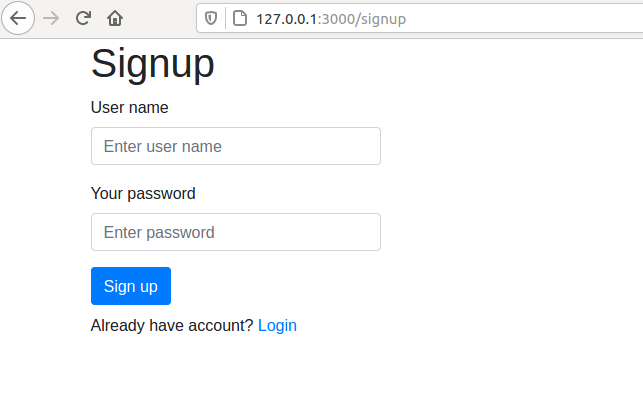
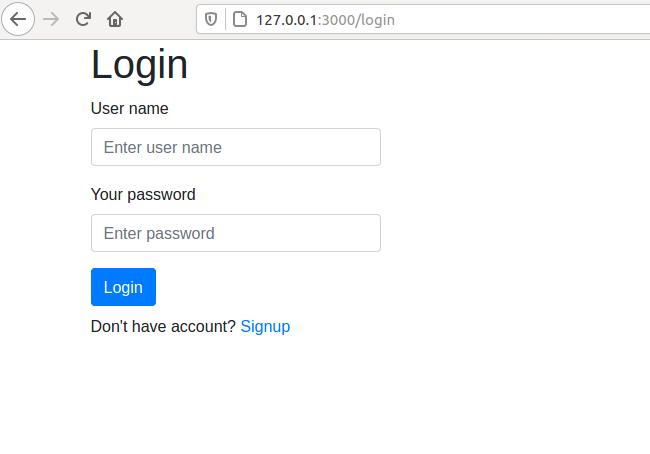
In this post, we will create a user interface in React for authentication (Signup and Login views). Components will not perform any actions (they won't be communicating with the backend, yet). We will use code from the previous post: Starting SaaS with Django and React (code with tag v1). In the next posts, we will create an authentication REST API in Django and provide actions in the frontend.

What will we do in this post:

  • Create React components (Home, Signup, Login, Dashboard).
  • Add routing with react-router-dom package between views.
  • Initialize Redux structure in the project.

In this tutorial we will use bootstrap with react-bootstrap package to build frontend user interface. If you would like to see post how to use React with other than bootstrap packages, please let me know by filling the form. Other packages can be: Material, Ant, Bulma, or Tailwind.

Add React Components

Please open a new terminal window and navigate to the frontend directory. Then, please run the development server:

It has hot-reloading, which means that all changes (after file save) are forcing the server to reload and serve the newest version (so we don't have to hit F5 constantly). You should see your frontend running at http://localhost:3000/.

Install packages

Please stop the dev server for a moment. We will need to install few new packages for start:

                          # for user interface              npm              install              react-bootstrap bootstrap              # for routing              npm              install              react-router-dom                      

(The react-router-dom documentation, if you need to check it). After installation please run again the dev server (npm start). You can also check the frontend/package.json file, the newly installed packages should be added there.

You need to add bootstrap.css import in frontend/src/index.js file.

                          // ...              // add this import in frontend/src/index.js              // add it before index.css import              import              "              bootstrap/dist/css/bootstrap.css              "              ;              // ...                      

Let's clean our React app

The React app was generated with standard starting script. It has code that we will not need. Please remove the frontend/src/App.css file and remove all content in frontend/src/index.css (we will keep the file, maybe it will be needed in the future). Please also delete files:

  • frontend/public/logo192.png
  • frontend/public/logo512.png
  • frontend/src/logo.svg

Then, please update the frontend/public/manifest.json file:

                          {                                          "short_name"              :                                          "SaaSitive"              ,                                          "name"              :                                          "SaaSitive Django+React Boilerplate"              ,                                          "icons"              :                                          [                                          {                                          "src"              :                                          "favicon.ico"              ,                                          "sizes"              :                                          "64x64 32x32 24x24 16x16"              ,                                          "type"              :                                          "image/x-icon"                                          }                                          ],                                          "start_url"              :                                          "."              ,                                          "display"              :                                          "standalone"              ,                                          "theme_color"              :                                          "#000000"              ,                                          "background_color"              :                                          "#ffffff"                                          }                                                  

You can use your values for short_name and name.

Let's go to frontend/src/App.js, remove its content, and replace it with the following code:

                          import              React              ,              {              Component              }              from              "              react              "              ;              class              App              extends              Component              {              render              ()              {              return              <              h1              >Hi!</              h1              >;              }              }              export              default              App              ;                      

The development server should refresh the http://localhost:3000 website and display "Hi!".

OK, let's add components directory in frontend/src and Home.js file in it.

                          // frontent/src/components/Home.js              import              React              ,              {              Component              }              from              "              react              "              ;              import              {              Container              }              from              "              react-bootstrap              "              ;              class              Home              extends              Component              {              render              ()              {              return              (              <              Container              >              <              h1              >Home</              h1              >              </              Container              >              );              }              }              export              default              Home              ;                      

Wait … How to navigate to Home.js view? We will need a router! (It is already installed with react-router-dom package)

Let's go to App.js file.

                          // frontend/src/App.js              import              React              ,              {              Component              }              from              "              react              "              ;              import              {              BrowserRouter              ,              Route              ,              Switch              }              from              "              react-router-dom              "              ;              import              Home              from              "              ./components/Home              "              ;              class              App              extends              Component              {              render              ()              {              return              (              <              div              >              <              BrowserRouter              >              <              Switch              >              <              Route              exact              path              =              "/"              component              =              {              Home              }              />              </              Switch              >              </              BrowserRouter              >              </              div              >              );              }              }              export              default              App              ;                      

We added BrowsableRouter with Switch and one Route to path="/". It routes to our Home component. We can add more components. We will add them in separate directories, because later we will create actions and reducers for each (the Redux part).

Let's add signup, login, dashboard directories in frontend/src/components.

Please add Signup component in the file frontend/src/componenets/signup/Signup.js:

                          // frontend/src/componenets/signup/Signup.js              import              React              ,              {              Component              }              from              "              react              "              ;              import              {              Container              }              from              "              react-bootstrap              "              ;              class              Signup              extends              Component              {              render              ()              {              return              (              <              Container              >              <              h1              >Signup</              h1              >              </              Container              >              );              }              }              export              default              Signup              ;                      

Please add Login component in the file frontend/src/componenets/login/Login.js:

                          // frontend/src/componenets/login/Login.js              import              React              ,              {              Component              }              from              "              react              "              ;              import              {              Container              }              from              "              react-bootstrap              "              ;              class              Login              extends              Component              {              render              ()              {              return              (              <              Container              >              <              h1              >Login</              h1              >              </              Container              >              );              }              }              export              default              Login              ;                      

Please add Dashboard component in the file frontend/src/componenets/dashboard/Dashboard.js:

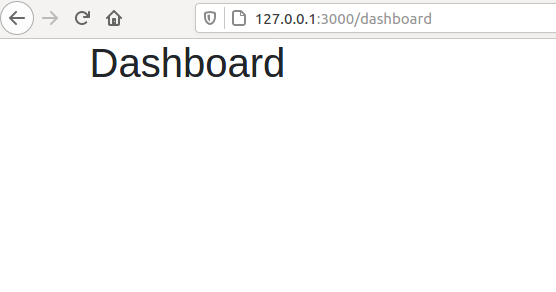
                          // frontend/src/componenets/dashboard/Dashboard.js              import              React              ,              {              Component              }              from              "              react              "              ;              import              {              Container              }              from              "              react-bootstrap              "              ;              class              Dashboard              extends              Component              {              render              ()              {              return              (              <              Container              >              <              h1              >Dashboard</              h1              >              </              Container              >              );              }              }              export              default              Dashboard              ;                      

We have three new components. We will add them to our router.

Please update the frontend/src/App.js file:

                          // frontend/src/App.js file              import              React              ,              {              Component              }              from              "              react              "              ;              import              {              BrowserRouter              ,              Route              ,              Switch              }              from              "              react-router-dom              "              ;              import              Home              from              "              ./components/Home              "              ;              import              Signup              from              "              ./components/signup/Signup              "              ;              import              Login              from              "              ./components/login/Login              "              ;              import              Dashboard              from              "              ./components/dashboard/Dashboard              "              ;              class              App              extends              Component              {              render              ()              {              return              (              <              div              >              <              BrowserRouter              >              <              Switch              >              <              Route              path              =              "/signup"              component              =              {              Signup              }              />              <              Route              path              =              "/login"              component              =              {              Login              }              />              <              Route              path              =              "/dashboard"              component              =              {              Dashboard              }              />              <              Route              exact              path              =              "/"              component              =              {              Home              }              />              </              Switch              >              </              BrowserRouter              >              </              div              >              );              }              }              export              default              App              ;                      

OK, it is time to test it! You can enter in the browser different paths and check if correct components are displayed. For example, please enter http://localhost:3000/login and you should see the Login component. The http://localhost:3000/dashboard should show a Dashboard component.

Maybe you wonder what is the difference between Route path and Route exact path (used for Home). You can try to check it yourself:

  • please enter: http://localhost:3000/signup/bla/bla/bla
  • please enter: http://localhost:3000/bla/bla/bla

The first one will show you Signup component, while the second one will show a blank window. The first URL will match the Signup route. The second one won't have match. If you would like to have a default match for any URL you can add the default route:

                          <              Route              path              =              "*"              >Ups</              Route              >                      

It will display "Ups" for unknown matches.

Your fronted code structure should look like below after this part of the post:

                          .              ├── package.json ├── package-lock.json ├── public │   ├── favicon.ico │   ├── index.html │   ├── manifest.json │   └── robots.txt ├── README.md ├── src │   ├── App.js │   ├── App.test.js │   ├── components │   │   ├── dashboard │   │   │   └── Dashboard.js │   │   ├── Home.js │   │   ├── login │   │   │   └── Login.js │   │   └── signup │   │       └── Signup.js │   ├── index.css │   ├── index.js │   ├── reportWebVitals.js │   └── setupTests.js └── yarn.lock                      

React components

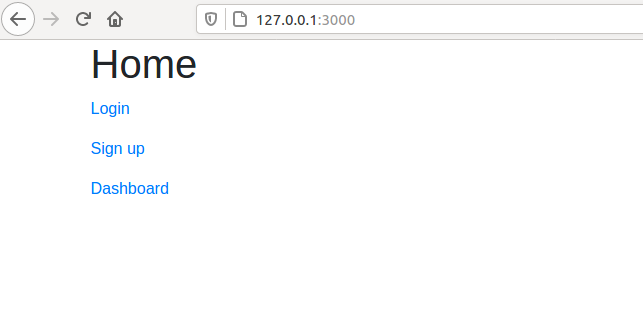
Let's add more code to the components. We will make Home.js as the main view with links to the other views:

                          // frontend/src/components/Home.js              import              React              ,              {              Component              }              from              "              react              "              ;              import              {              Link              }              from              "              react-router-dom              "              ;              import              {              Container              }              from              "              react-bootstrap              "              ;              class              Home              extends              Component              {              render              ()              {              return              (              <              Container              >              <              h1              >Home</              h1              >              <              p              >              <              Link              to              =              "/login/"              >Login</              Link              >              </              p              >              <              p              >              <              Link              to              =              "/signup"              >Sign up</              Link              >              </              p              >              <              p              >              <              Link              to              =              "/dashboard"              >Dashboard</              Link              >              </              p              >              </              Container              >              );              }              }              export              default              Home              ;                      

Please take a look that we are using Link from react-router-dom package for creating links. These links will use router to navigate to the correct view.

Now, we will define the user interface for creating the user account. Let's add more code to Signup.js file.

                          // frontend/src/components/signup/Signup.js              import              React              ,              {              Component              }              from              "              react              "              ;              import              {              Link              }              from              "              react-router-dom              "              ;              import              {              Container              ,              Button              ,              Row              ,              Col              ,              Form              ,              FormControl              }              from              "              react-bootstrap              "              ;              class              Signup              extends              Component              {              constructor              (              props              )              {              super              (              props              );              this              .              state              =              {              username              :              ""              ,              password              :              ""              };              }              onChange              =              e              =>              {              this              .              setState              ({              [              e              .              target              .              name              ]:              e              .              target              .              value              });              };              onSignupClick              =              ()              =>              {              const              userData              =              {              username              :              this              .              state              .              username              ,              password              :              this              .              state              .              password              };              console              .              log              (              "              Sign up                            "              +              userData              .              username              +              "                                          "              +              userData              .              password              );              };              render              ()              {              return              (              <              Container              >              <              Row              >              <              Col              md              =              "4"              >              <              h1              >Sign up</              h1              >              <              Form              >              <              Form              .              Group              controlId              =              "usernameId"              >              <              Form              .              Label              >User name</              Form              .              Label              >              <              Form              .              Control              type              =              "text"              name              =              "username"              placeholder              =              "Enter user name"              value              =              {              this              .              state              .              username              }              onChange              =              {              this              .              onChange              }              />              <              FormControl              .              Feedback              type              =              "invalid"              ></              FormControl              .              Feedback              >              </              Form              .              Group              >              <              Form              .              Group              controlId              =              "passwordId"              >              <              Form              .              Label              >Your password</              Form              .              Label              >              <              Form              .              Control              type              =              "password"              name              =              "password"              placeholder              =              "Enter password"              value              =              {              this              .              password              }              onChange              =              {              this              .              onChange              }              />              <              Form              .              Control              .              Feedback              type              =              "invalid"              ></              Form              .              Control              .              Feedback              >              </              Form              .              Group              >              </              Form              >              <              Button              color              =              "primary"              onClick              =              {              this              .              onSignupClick              }              >Sign up</              Button              >              <              p              className              =              "mt-2"              >              Already have account?              <              Link              to              =              "/login"              >Login</              Link              >              </              p              >              </              Col              >              </              Row              >              </              Container              >              );              }              }              export              default              Signup              ;                      

We use bootstrap forms to create signup form. It is only a visual part of it. It is not going to perform any actions, but we will add it soon (in the next posts). If you will write some username and password and click on Signup button, you should see some logs in your console (please open web tools to check console). There are two variables in the component's state: username and password. Both variables are connected with input fields.

Please take a notice that only username and password is required to create the account. In the future post, there will be an example where user name, email address, and password will be needed (the login will be based on email + password).

The code for Login.js (which is very similar to Signup.js):

                          // frontend/src/components/login/Login.js              import              React              ,              {              Component              }              from              "              react              "              ;              import              {              Link              }              from              "              react-router-dom              "              ;              import              {              Container              ,              Button              ,              Row              ,              Col              ,              Form              ,              FormControl              }              from              "              react-bootstrap              "              ;              class              Login              extends              Component              {              constructor              (              props              )              {              super              (              props              );              this              .              state              =              {              username              :              ""              ,              password              :              ""              };              }              onChange              =              e              =>              {              this              .              setState              ({              [              e              .              target              .              name              ]:              e              .              target              .              value              });              };              onLoginClick              =              ()              =>              {              const              userData              =              {              username              :              this              .              state              .              username              ,              password              :              this              .              state              .              password              };              console              .              log              (              "              Login                            "              +              userData              .              username              +              "                                          "              +              userData              .              password              );              };              render              ()              {              return              (              <              Container              >              <              Row              >              <              Col              md              =              "4"              >              <              h1              >Login</              h1              >              <              Form              >              <              Form              .              Group              controlId              =              "usernameId"              >              <              Form              .              Label              >User name</              Form              .              Label              >              <              Form              .              Control              type              =              "text"              name              =              "username"              placeholder              =              "Enter user name"              value              =              {              this              .              state              .              username              }              onChange              =              {              this              .              onChange              }              />              <              FormControl              .              Feedback              type              =              "invalid"              ></              FormControl              .              Feedback              >              </              Form              .              Group              >              <              Form              .              Group              controlId              =              "passwordId"              >              <              Form              .              Label              >Your password</              Form              .              Label              >              <              Form              .              Control              type              =              "password"              name              =              "password"              placeholder              =              "Enter password"              value              =              {              this              .              state              .              password              }              onChange              =              {              this              .              onChange              }              />              <              Form              .              Control              .              Feedback              type              =              "invalid"              ></              Form              .              Control              .              Feedback              >              </              Form              .              Group              >              </              Form              >              <              Button              color              =              "primary"              onClick              =              {              this              .              onLoginClick              }              >Login</              Button              >              <              p              className              =              "mt-2"              >              Don't have account?              <              Link              to              =              "/signup"              >Signup</              Link              >              </              p              >              </              Col              >              </              Row              >              </              Container              >              );              }              }              export              default              Login              ;                      

After above steps you should have following views:
Add Redux to React

Redux will help us organize and manage the application data. It consists of three main concepts:

  • Store which keeps information about application state (data),
  • Reducer that specify how the state is changed in response to actions,
  • Actions the source of information for the Store.

Before adding new code, let's install necessary packages:

            npm              install              redux react-redux redux-thunk connected-react-router                      

First we will define the Reducer. Please add Reducer.js file in frontend/src directory:

                          // frontend/src/Reducer.js              import              {              combineReducers              }              from              "              redux              "              ;              import              {              connectRouter              }              from              "              connected-react-router              "              ;              const              createRootReducer              =              history              =>              combineReducers              ({              router              :              connectRouter              (              history              )              });              export              default              createRootReducer              ;                      

If we will create a new reducer for a component we will add it here. It is the main reducer that concatenates all component's reducers from the application.

Then, we need to add Store to our application. Please add Root.js file in frontend/src directory:

                          // frontend/src/Root.js              import              React              from              "              react              "              ;              import              thunk              from              "              redux-thunk              "              ;              import              {              Provider              }              from              "              react-redux              "              ;              import              {              createBrowserHistory              }              from              "              history              "              ;              import              {              applyMiddleware              ,              createStore              }              from              "              redux              "              ;              import              {              routerMiddleware              ,              ConnectedRouter              }              from              "              connected-react-router              "              ;              import              rootReducer              from              "              ./Reducer              "              ;              const              Root              =              ({              children              ,              initialState              =              {}              })              =>              {              const              history              =              createBrowserHistory              ();              const              middleware              =              [              thunk              ,              routerMiddleware              (              history              )];              const              store              =              createStore              (              rootReducer              (              history              ),              initialState              ,              applyMiddleware              (...              middleware              )              );              return              (              <              Provider              store              =              {              store              }              >              <              ConnectedRouter              history              =              {              history              }              >              {              children              }              </              ConnectedRouter              >              </              Provider              >              );              };              export              default              Root              ;                      

The last change will replace Router with Root component in App.js.

                          // frontend/src/App.js              import              React              ,              {              Component              }              from              "              react              "              ;              import              Root              from              "              ./Root              "              ;              // <------------- new import              import              {              Route              ,              Switch              }              from              "              react-router-dom              "              ;              // <--- remove BrowserRouter              import              Home              from              "              ./components/Home              "              ;              import              Signup              from              "              ./components/signup/Signup              "              ;              import              Login              from              "              ./components/login/Login              "              ;              import              Dashboard              from              "              ./components/dashboard/Dashboard              "              ;              class              App              extends              Component              {              render              ()              {              return              (              <              div              >              <              Root              >              {              /* replace BrowserRouter with Root */              }              <              Switch              >              <              Route              path              =              "/signup"              component              =              {              Signup              }              />              <              Route              path              =              "/login"              component              =              {              Login              }              />              <              Route              path              =              "/dashboard"              component              =              {              Dashboard              }              />              <              Route              exact              path              =              "/"              component              =              {              Home              }              />              <              Route              path              =              "*"              >Ups</              Route              >              </              Switch              >              </              Root              >              {              /* replace BrowserRouter with Root */              }              </              div              >              );              }              }              export              default              App              ;                      

The application should run without any changes in the behavior. We've just added empty skeleton for Redux. We will add more to it in the next posts.

Commit code to the repository

Please remember to commit all code changes to the repository:

                          git add src/components/ git add src/Reducer.js git add src/Root.js git add package-lock.json   git commit              -am              "add signup and login components"              git push                      

Summary

  • We added new components (Home, Signup, Login, and Dashboard) to the fronted.
  • There is routing defined between component's views.
  • The Redux skeleton was added to the React application.

What's next?

We will add authentication REST API in the backend. We will use Token-based authentication from Django Rest Framework and Djoser package. Our authentication REST API will be able to:

  • create (signup) a new user,
  • login and logout the user,
  • return user information.

Next article: Token Based Authenitcation with Django Rest Framework and Djoser


Let's stay in touch!

Would you like to be notified about new posts? Please fill this form.